
It's a Monday or Tuesday morning. You find an email sitting in your inbox announcing the week's latest sale from Southwest Airlines. Wanderlust immediately kicks in. You need a vacation. You dream of flying somewhere. But where?
If you don't know (or don't care) what destination you go to but simply want to find the very best Southwest travel deals, how can you do that?

I've flown on hundreds and hundreds of flights aboard Southwest in the last decade with and without my kids. I'm on the Southwest website pretty much daily searching for great deals. I have A-List status on the airline, and my husband and I each hold a Southwest Companion Pass. So I have a lot of expertise when it comes to making Southwest offers work to enable my family to travel much more—for much less.
Related: The Complete Guide to Flying Southwest Airlines with Kids
Whether you have specific dates in mind or are flexible, here's how you can quickly go about investigating a variety of Southwest flight options to a variety of travel destinations that will fit within your budget.
Survey nonstop & connecting flight options from your home airport.
First things first: dust off your laptop. Mobile apps simply will not be powerful or quick enough to do this kind of research. Sorry, Gen Z.
Once you have have the right device, the best place to start in my opinion is to investigate the available flight itinerary options on Southwest from your home airport, both nonstop and connecting.
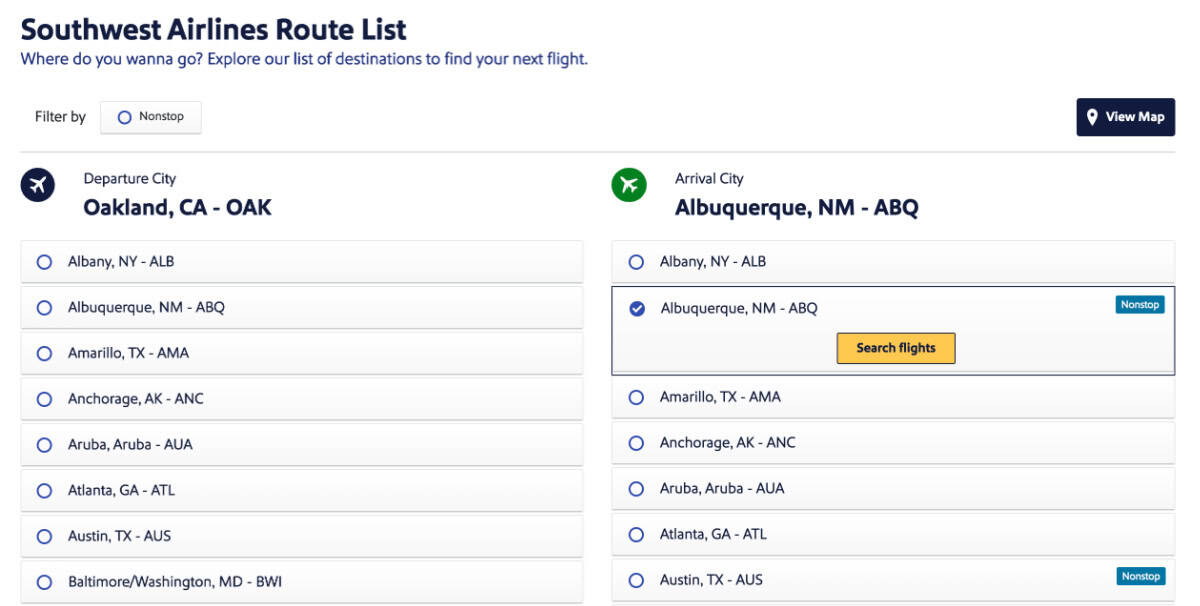
Head to Southwest's route map page (I like to use this version in list form) and select your home airport on the left from the list of cities. A list of available destinations will appear on the right, with nonstop destinations flagged with a blue icon.
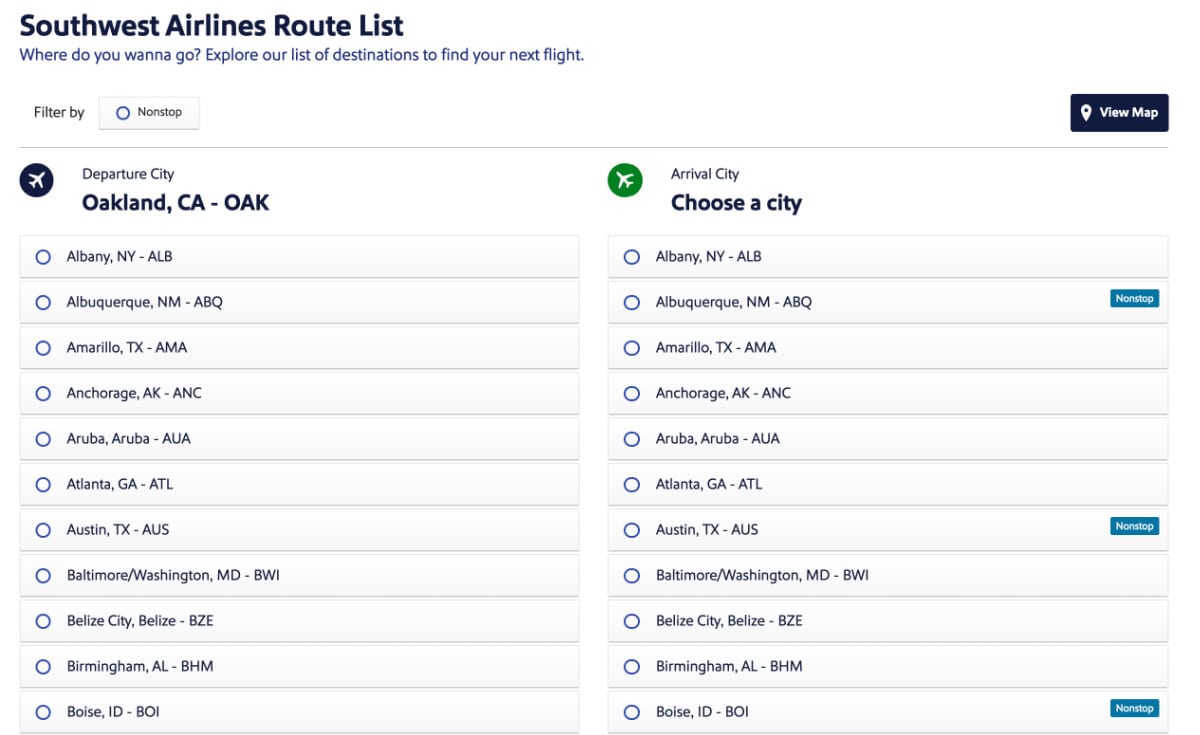
Click the "Filter by nonstop" setting at the top to only see the cities that have nonstop service from your home airport. This shorter list is going to help you to zero in on destinations you may want to target in your searches, especially if you just want to plan a quick weekend getaway when you don't have time to risk a missed connection.
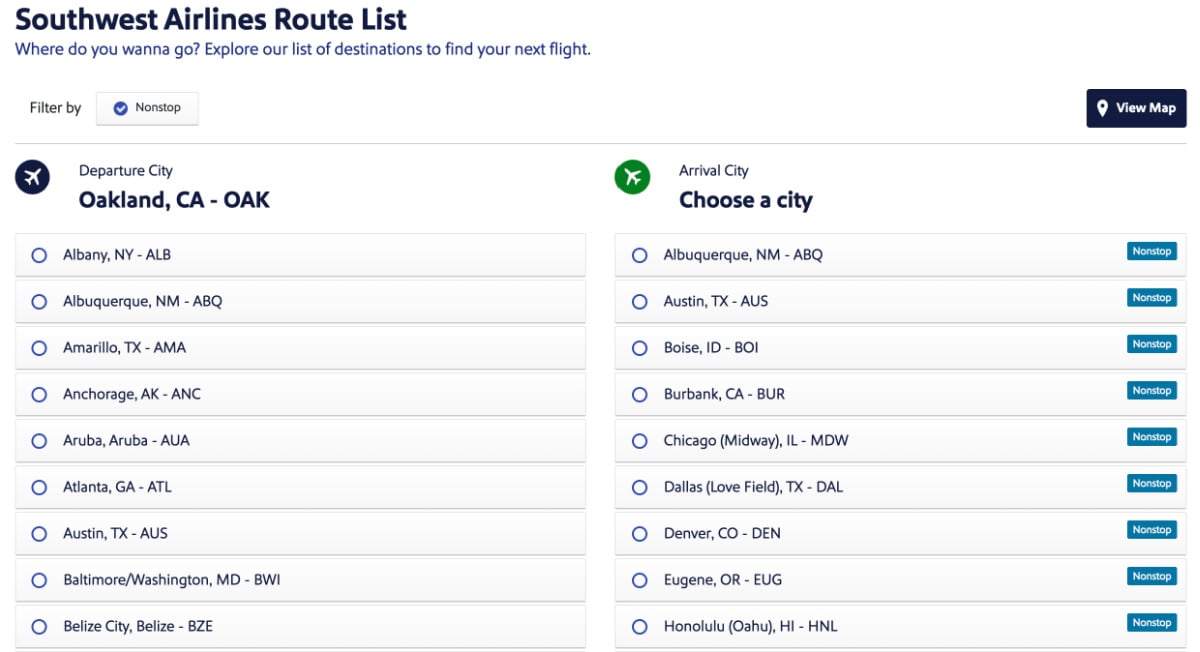
As you can see, my beloved home airport, Oakland San Francisco Bay International Airport, is a city with a lot of Southwest nonstop flight choices (so many I have to scroll to see all 26 of them!).
Advanced tip to search nonstop flights:
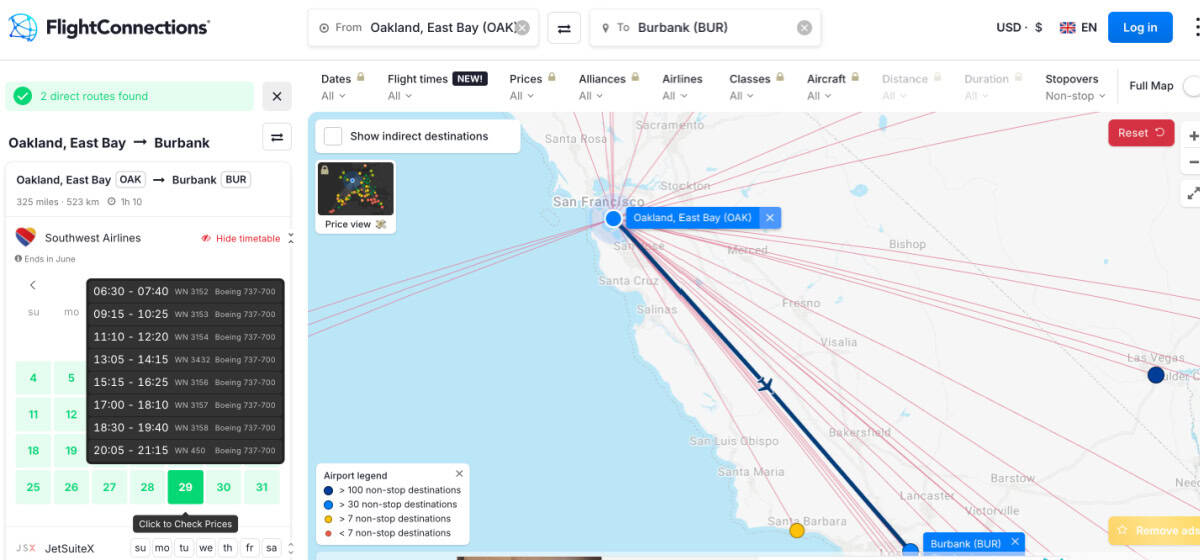
If you want to do a deeper dive into nonstop flights and their frequency at this stage, you can detour to a website called FlightConnections.com. There you can put in a city pair and a calendar result will show you what days of the week there are nonstop flights between those cities and on which airlines. Hover on a specific date to see the flight times on that day so you can see the frequency of daily flights. This can help you rule out cities that don't have enough service to consider seriously.
Here's a sample result of Southwest flights between OAK and BUR, with multipls flights daily.
Delve into Southwest's landing page for your home airport.
Even if you use the Southwest website often, you might not know that Southwest has a landing page for each and every city that it serves. Your next stop should be that landing page for your home airport.
To find the right page, search "cheap Southwest flights from [AIRPORT CODE]" on a search engine like Google or Duck Duck Go. It's usually the first non-sponsored result. The URL should look something like this:
- https://www.southwest.com/en/flights/flights-from-cityname
Then scroll down just a bit from the very top of the page to a section called "Book flights from [Your City] with Southwest Airlines."
Using Oakland again (https://www.southwest.com/en/flights/flights-from-oakland) as an example, there will be a list with graphics of a variety of cities that passengers can fly to from Oakland. You may have to click "view more" at the bottom to scroll the entire list.
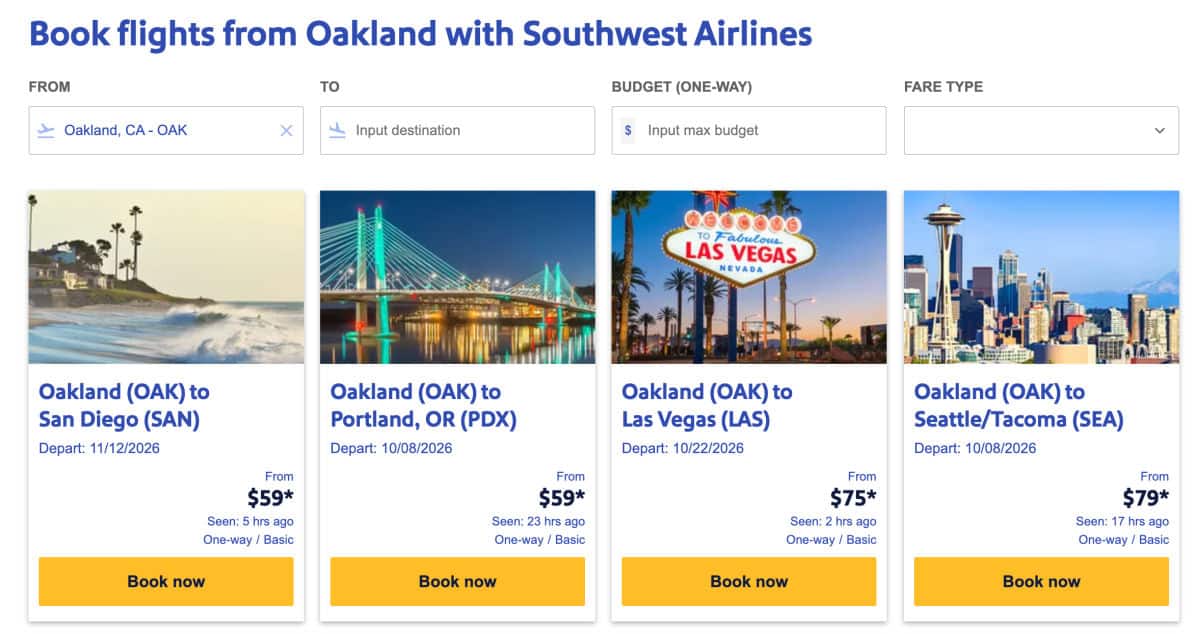
This list shows all destinations available on both nonstop and connecting itineraries. If you've already done the legwork to peek at the nonstop cities from the step above, you can mentally ignore the connecting city results as you scroll if you don't want to take a connection.
The list is sorted in order of fare price from lowest to highest.
To be clear, this doesn't mean you can actually find those lowest fares on the days you actually plan to travel. These are just the absolute lowest fares between those city pairs anywhere on Southwest's currently available flight schedule, which is usually open about 6-10 months in advance.
This list is nevertheless helpful because it can give you a sense of what cities tend to be cheaper destinations from your home airport. You may be surprised to learn that the cheapest ones might not be the destinations that are shortest distance away! For Oakland right now, for example, the cheapest flights are to San Diego or Portland, despite the fact that OAK has many Southwest flights to much closer destinations like Santa Barbara, Burbank, Ontario, and more.
Pop into multiple Low Fare Calendars for destination cities of interest.
The next and most important step is to use Southwest's low fare calendar tool to investigate prices to multiple destinations on your specific travel date or dates. The calendar is really helpful and time-saving in a lot of search scenarios (especially if you have time flexibility), as it gives you a 2 month view of fares so you can quickly glance at a lot of options.
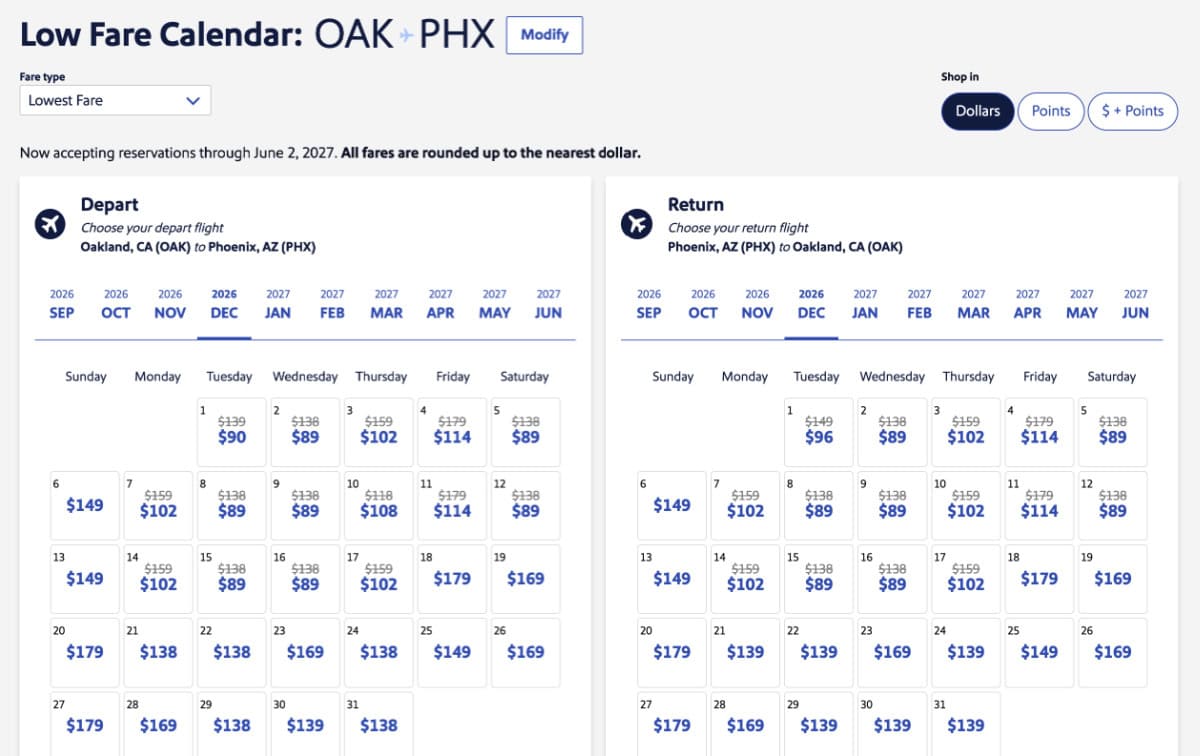
But the key when you don't know where you want to go is being able to look at a lot of low fare calendars very quickly. It's tedious to have to manually input city pairs again and again into a search tool, run a search, and start over again with a new city.
Luckily there are a few pages on Southwest's website that allow you to shortcut this process, but they are a bit buried and hard to get to if you don't know they exist.
If there is an ongoing sale being advertised on the front page of the Southwest website, you can usually stumble on the right tool by clicking on a banner ad for the sale itself. For the current WOW sale running 9/14-9/17/26, this link will get you to the landing page that works best (note: to find it, I had to click on the sale graphic on the front page of Southwest's site and then further click on the Book Now banner ad pictured below on that page - not very intuitive!).

Ultimately, you are looking to find yourself on a search tools page with a subheading that says "Search for low fares" (circled in red below) where you can select your home city from a drop down menu. A list of nonstop and connecting destinations will also appear on the right with a yellow button that says "Select Dates."
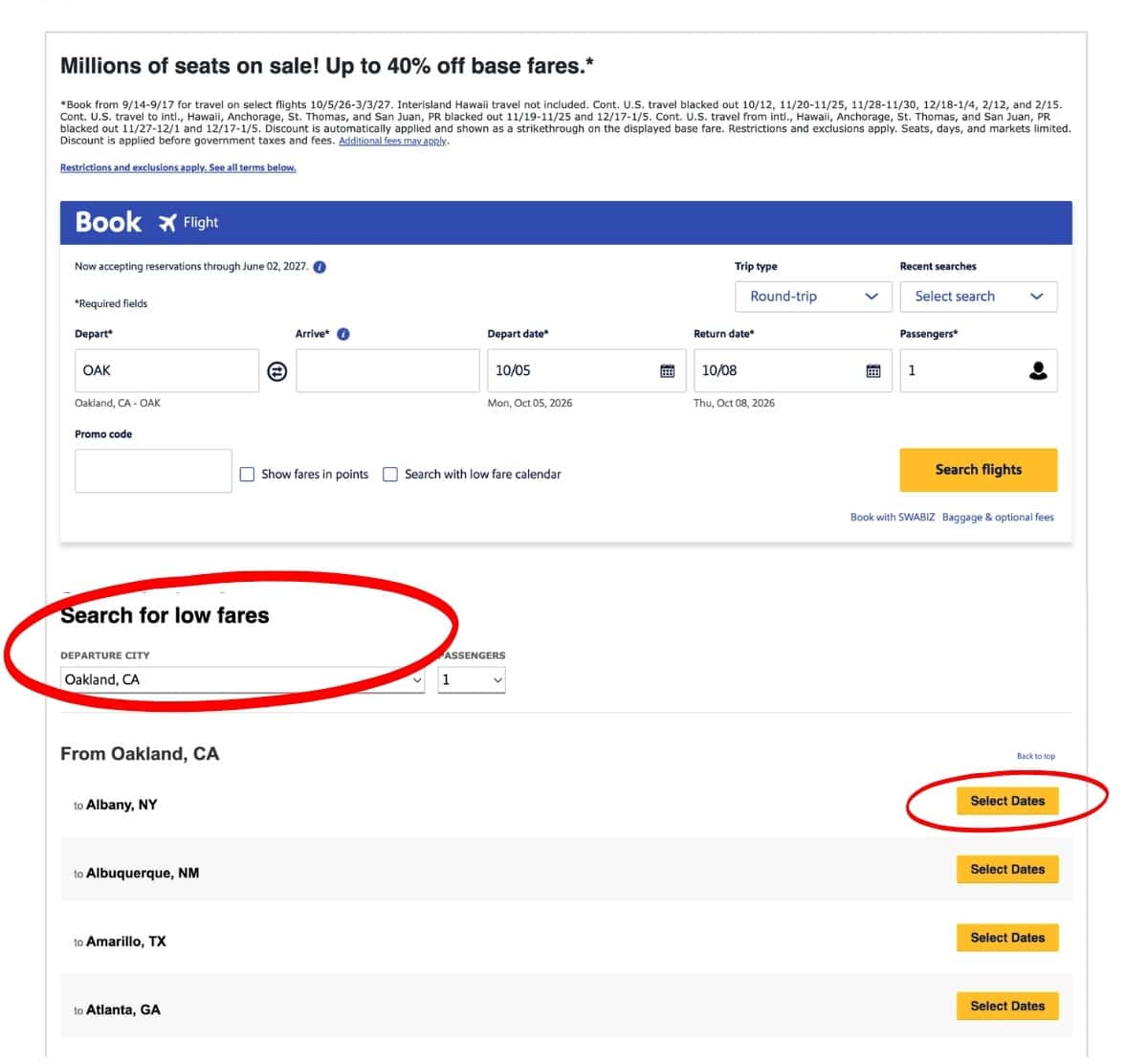
Clicking on one of those yellow buttons will launch a low fare calendar for that specific route. I recommend right clicking on several of those buttons (or Command+click on Apple devices) to launch multiple city calendars each in their own tab all at once. From there, you can easily glance at a dozen or more low fare calendars for many cities in seconds.
Alternatively, you can start from the Southwest route list from the first step of this search process. This starting point may be easier if you only want to look at nonstop destinations.
From there, simply select your originating airport, decide whether you want to toggle the nonstop flights filter on or off, and then select a destination city on the right. Click the yellow "Search flights" buttons by each destination to launch the low fare calendar. Right clicking to launch multiple calendars in multiple tabs works here as well.
Explore flight choices on specific days & book the right fare.
The low fare calendar is the most helpful tool on the site, but it's important to know its limitations. It will show you the lowest fare between two cities on that day, but that doesn't mean the flight with the lowest fare will be one you actually want to take.
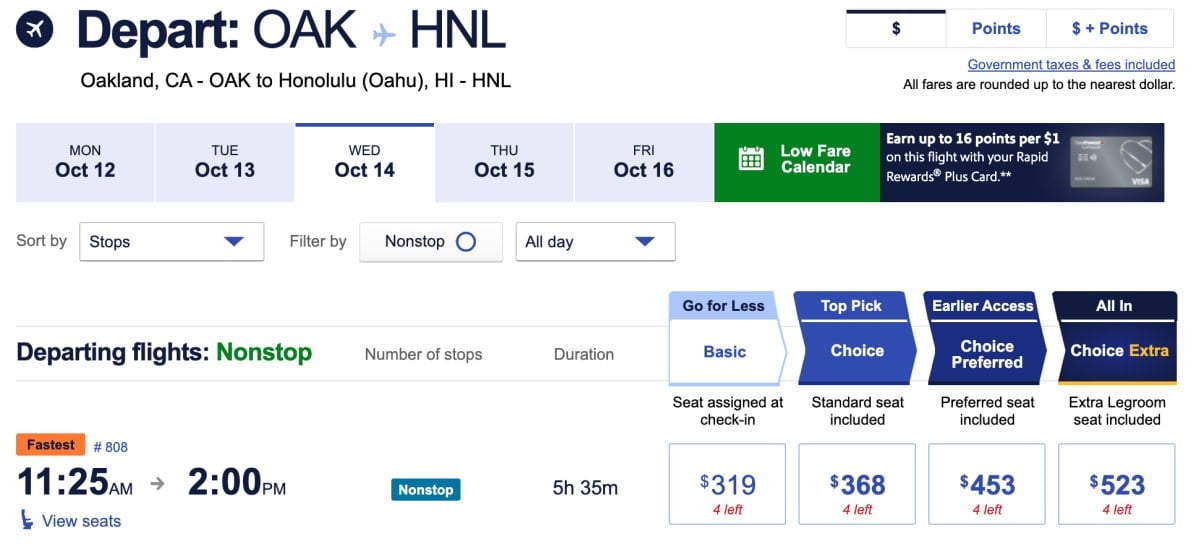
In some instances, the lowest fare on a given day will only be available on a connecting itinerary between those two cities, even when there are nonstop flights available. Take this example from OAK to HNL.
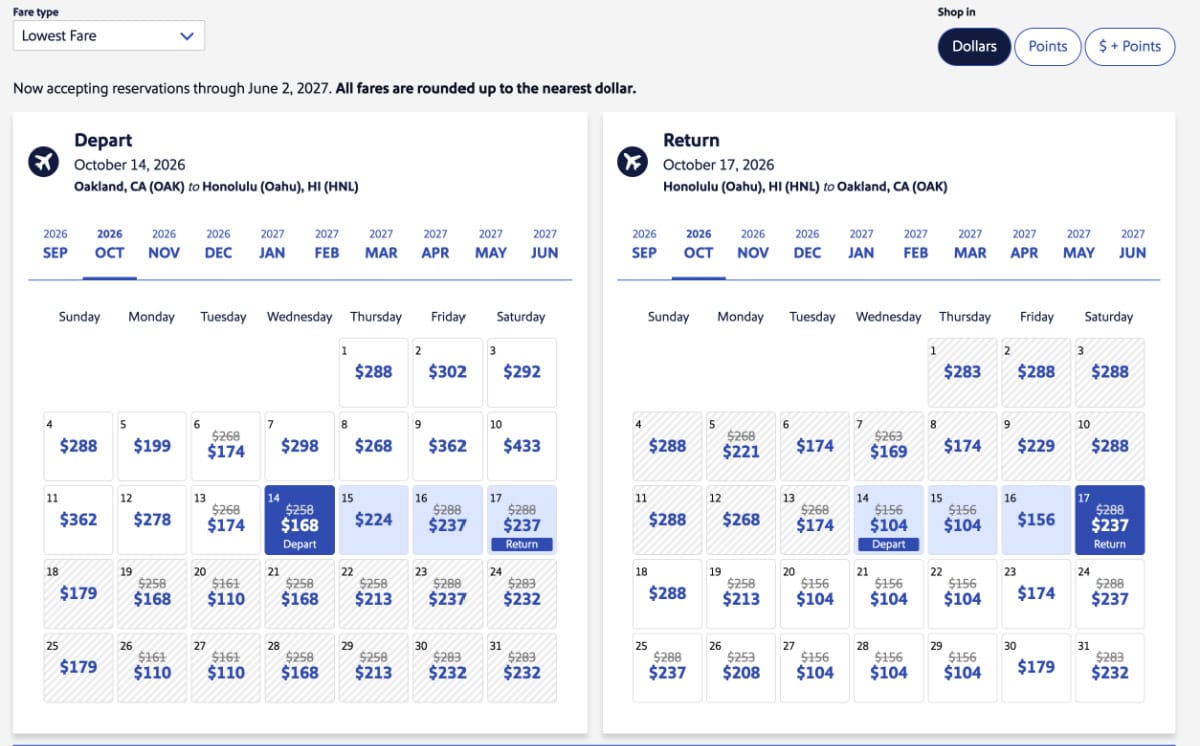
The $168 one-way fare on the low fare calendar looks enticing, but when you click through to the results, you'll find that the only daily nonstop OAK to HNL flight that day is actually $319.
To snag that low fare, you'll need to add in a connection in Kauai (LIH).
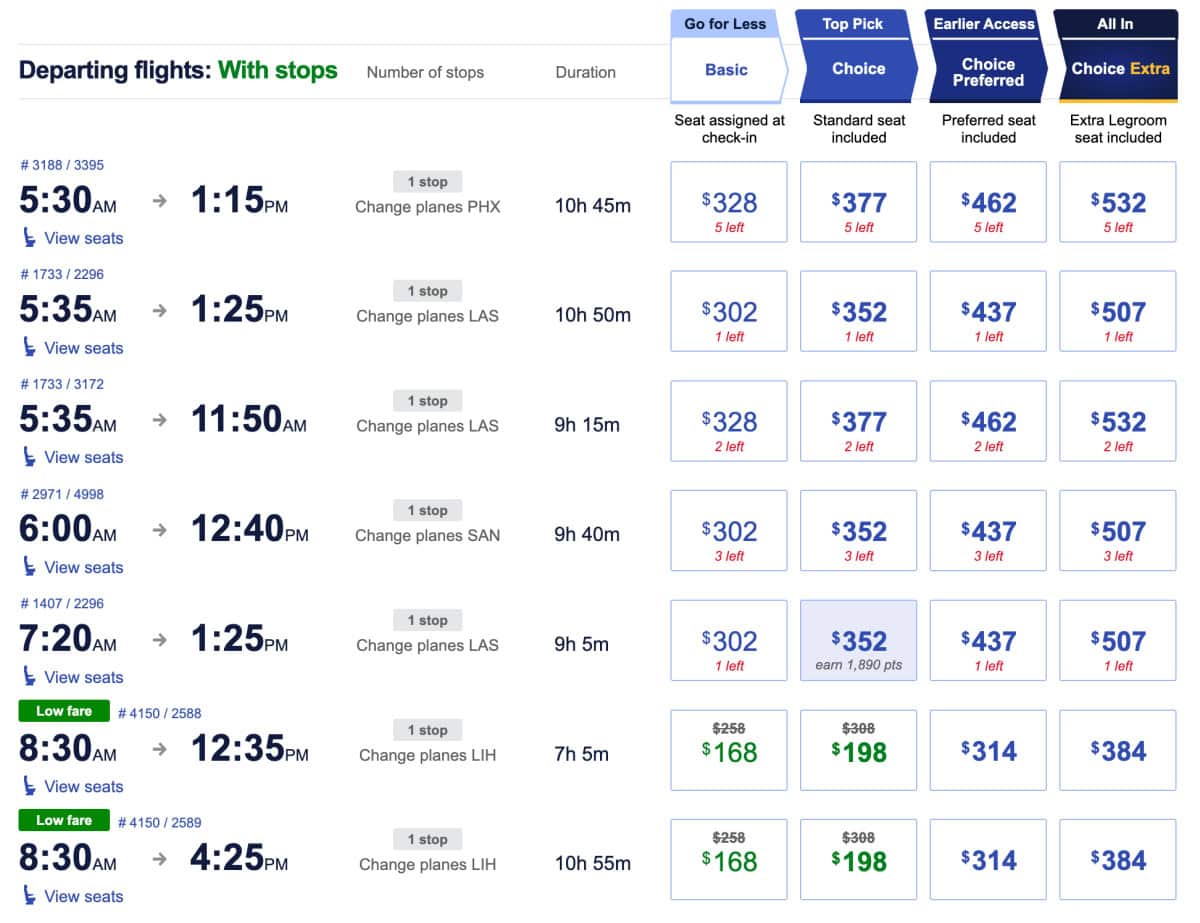
If the price is right and a connection time is good, however, this may work for you just fine if you are looking to save money. In fact, my family and I recently took a Southwest flight back from Hawaii connecting through LAX to OAK to capitalize on just this kind of deal.
If you are set on nonstop flights or don't want to fly too early or too late in the day, you'll probably have to run some more searches on individual routes to suss out the very best deals on dates and times that work for you. But you'll likely have been able to narrow those searches down to just a few cities now based on the earlier legwork you've done.
Once you finally settle on flights, the last step is making sure you book a fare that has the features you need and none of the ones you don't. If you are new to Southwest (or just new to Southwest's many recent changes), these articles will help you with that process:
- Which of Southwest's New Fare Types Should You Purchase?
- As a Southwest Frequent Flyer, Here's What I'm Doing Differently to Adjust to the Airline's Recent Changes
- How Travelers Are Getting Tripped Up by Southwest's New Rules—Don't Be One of Them!
My general rule of thumb? If I'm booking with Southwest Rapid Rewards points, I always book Basic. If I'm booking with cash (especially if I'm planning many months in advance), I'm usually booking a Choice fare. I never ever book Choice Preferred or Choice Extra.
Other search tools & options: Google Flights hack
There are a lot of other ways to investigate cheap flight deals on Southwest or its competitors. You may also want to search on Google Flights (which has a cool feature that lets you input "Anywhere" as a destination option) and experiment with some of the AI tools there.
So far, however, I've not found these tools to be as reliable or exhaustive as using Southwest's site, especially as I have to then go and fact check each individual result. You can never really predict when AI will hallucinate on you!
If you want to use Google Flights to search for just Southwest flights to a variety of destinations, you'll likely hit a roadblock. If you start with Google Flights' Anywhere search, you won't be able to sort or filter search results by just Southwest flights (the only options will be to filter by major airline alliances). Frustrating.
Thankfully, there's a hack for that. Instead, what you should do is run a dummy search from your home airport to a random destination on dates of your choosing. Here's one I did from OAK to PHX.
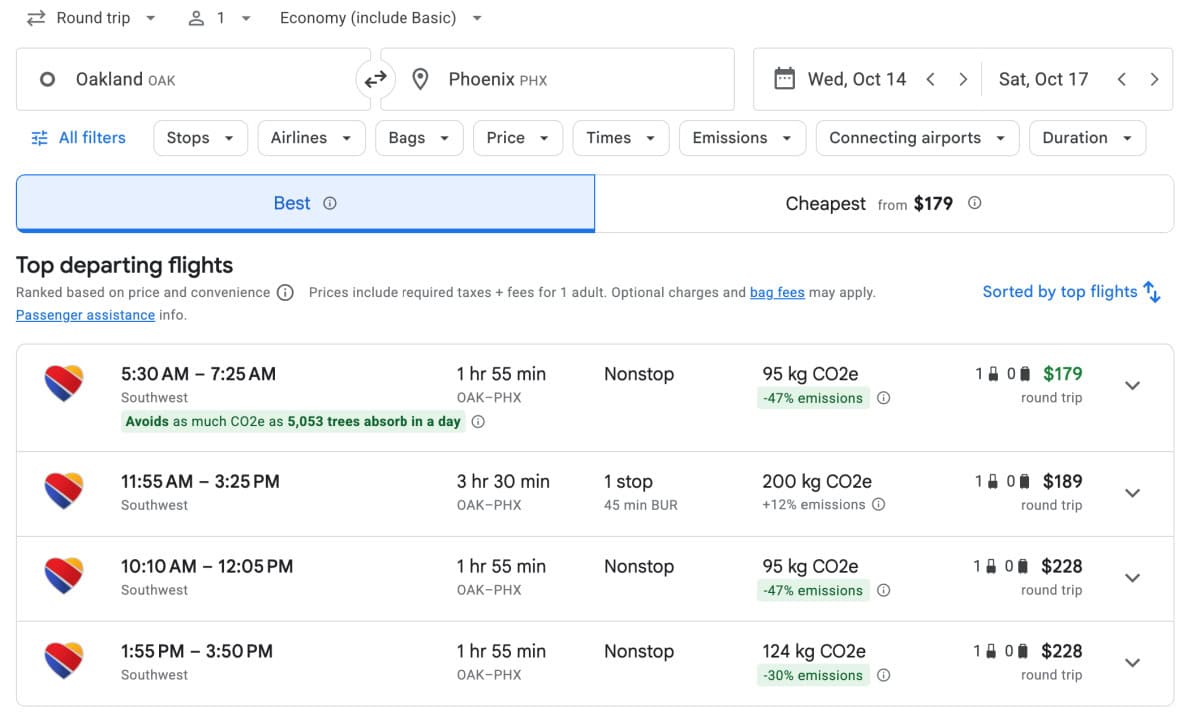
When you get those search results, you can filter them by airline. Select Southwest only. If you want to only look at nonstop destinations, you can add that as a filter too.
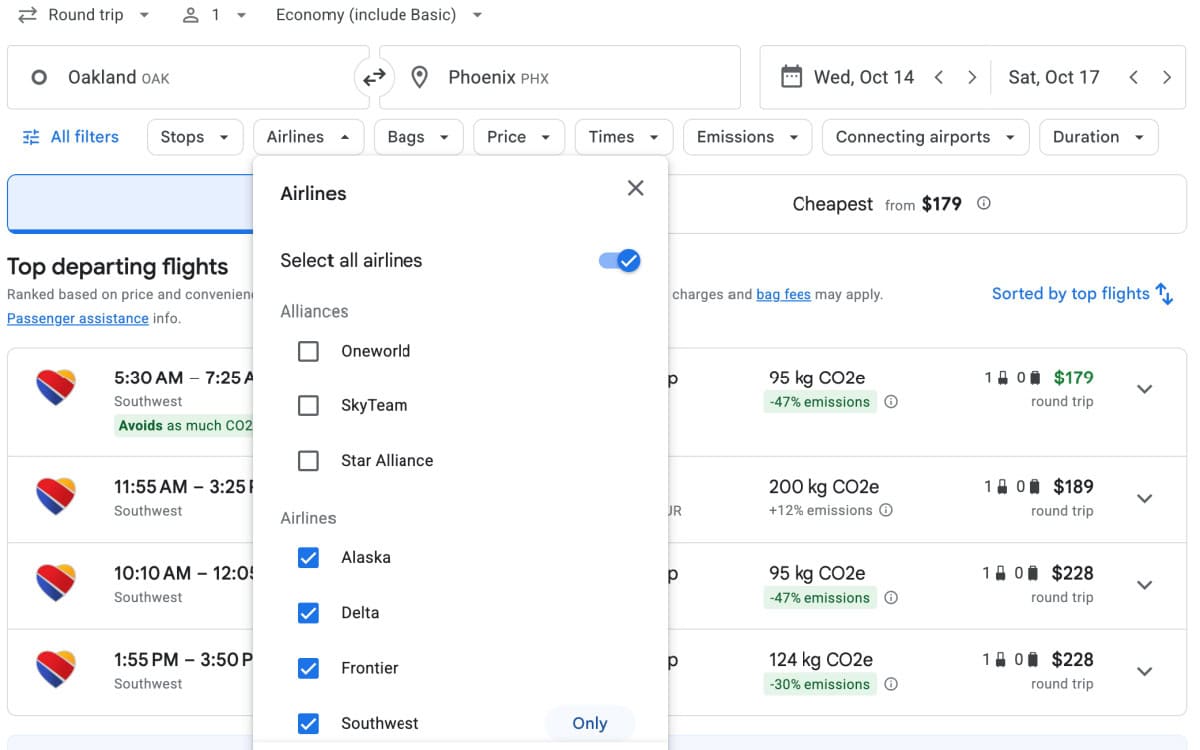
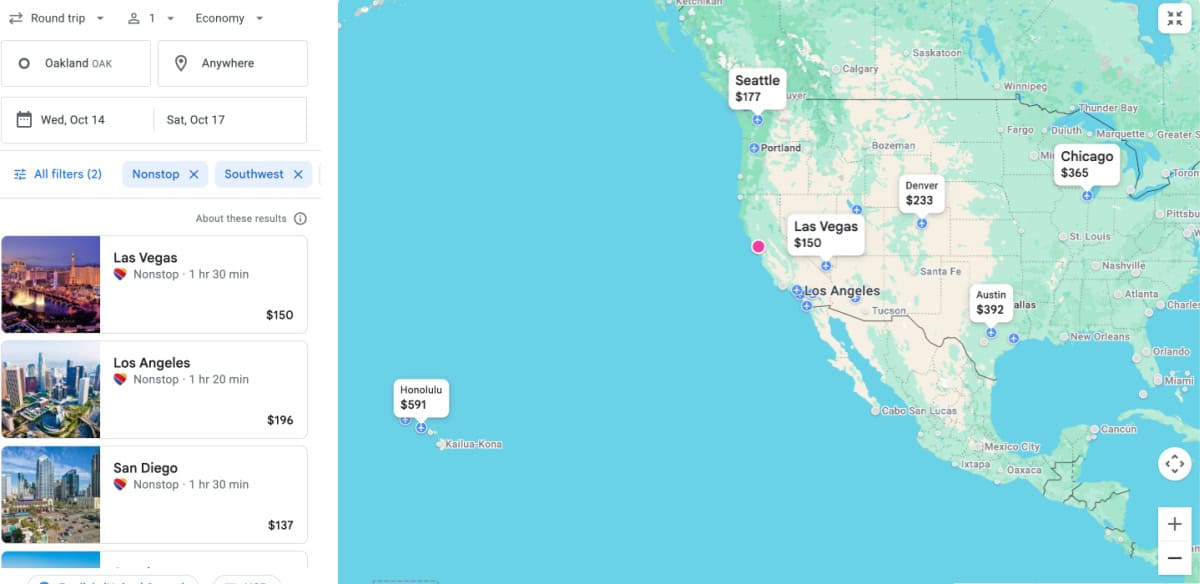
Then, type Anywhere in to the destination field replacing the random city (PHX in my case) you initially chose.
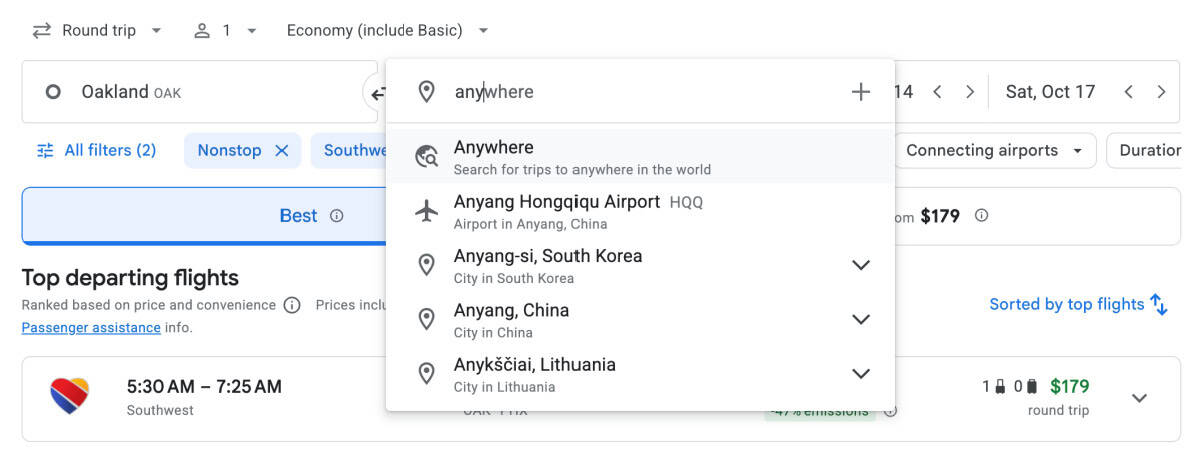
The results will be a map and list of multiple destinations and fares with a Southwest (and optionally, a nonstop) filter applied! You can easily just adjust dates from this results page too. Pretty darn useful.
Final Thoughts

The next time a Southwest sale catches your eye when you don't have a destination in mind, you'll now be ready. You can hopefully save yourself lots of time and clicks with a these simple strategies to find flight deals to new and exciting places on your bucket list.
sit together & check bags for less!
Best Credit Card for Southwest Family Travelers
I highly recommend that families flying Southwest carry the Southwest Rapid Rewards Priority Credit Card. This card allows the cardmember and everyone booked on the same reservation to select an advanced seat assignment (even on the cheapest Basic fares) plus check a bag of up to 50 pounds. The card more than pays for itself for a family of four on a single roundtrip itinerary!
The card currently has a signup bonus of 60,000 Rapid Rewards points (after spending $2000 in 3 months) worth $700-800+ in free travel aboard Southwest - also well worth its $229 annual fee.
Card Perks at a Glance:
- Advance seat selection.
- Free checked bag per person.
- Guaranteed Group 5 or better boarding.
- Earn 4x points per $1 spent on Southwest direct purchases.
- Earn 2x points per $1 spent on gas stations & restaurants.
- Earn 1x point per $1 spent on all other purchases.
- No foreign transaction fees.
- 7,500 bonus points on renewal each anniversary year.



Leave a Reply